Sprite Fusion
Create stunning 2D maps effortlessly with seamless engine integration.
Key Takeaways
- What it is
- Create stunning 2D maps effortlessly with seamless engine integration.
- Pricing
- $11.99,. offering offline access
- Best for
- User-Friendly Interface
- Seamless Integration
- Auto-Tiling System
- Rating
- 4.6/5
What is Sprite Fusion?
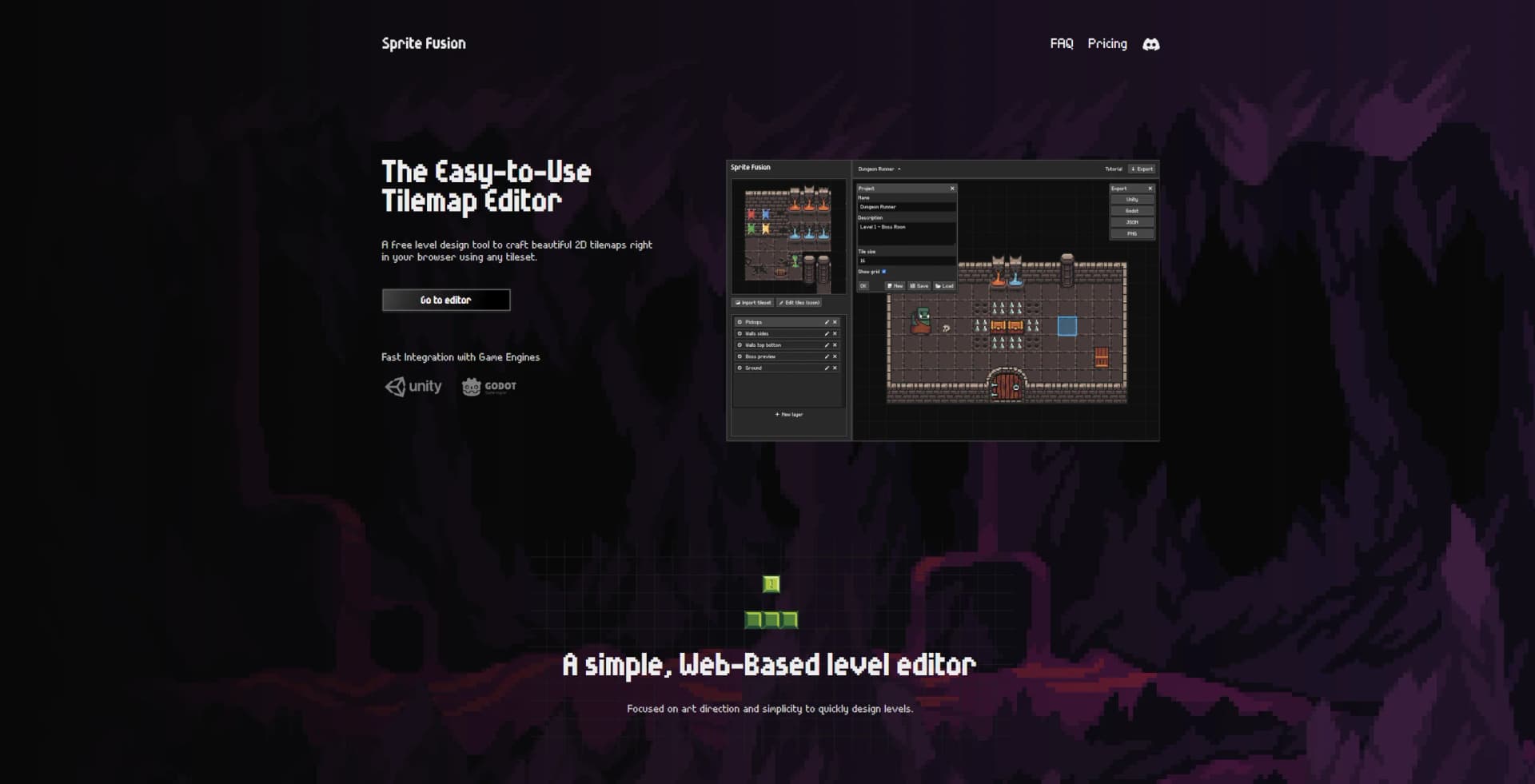
Sprite Fusion is an innovative, web-based tilemap editor designed to simplify the creation of beautiful 2D maps for game development. It is a free tool that empowers game designers to craft detailed tilemaps directly in their browsers, seamlessly integrating with popular game engines like Unity, Godot, and Defold. With a focus on art direction and simplicity, Sprite Fusion is tailored for both amateur and professional game developers looking to streamline their level design process without the need for complex coding.
Sprite Fusion stands out with its seamless integration capabilities, allowing users to export tilemaps directly as native packages for major game engines without any custom coding. Its combination of a user-friendly interface and powerful features like auto-tiling makes it an ideal choice for both novice and seasoned game designers, setting it apart in the realm of 2D game development tools.
Sprite Fusion offers an exceptional blend of simplicity, functionality, and affordability, making it a valuable tool for anyone involved in 2D game development. Whether you're an indie developer, a student, or a professional game artist, Sprite Fusion provides the resources and flexibility needed to bring your creative visions to life, all while ensuring seamless integration with popular game engines.
Who is Using Sprite Fusion?
Indie Game Developers
Utilizing Sprite Fusion for cost-effective and efficient 2D game design.
Game Design Students
Employed as a learning tool in educational settings to teach game development fundamentals.
Freelance Game Artists
Leveraging the tool for quick prototyping and client projects.
Mobile Game Developers
Using Sprite Fusion’s native export features for mobile-friendly game engines like Defold.
Uncommon Use Cases
Adopted by digital artists for creating interactive art projects; used by educators for teaching digital design principles.
Key Features
Rating Breakdown
Pricing Plans
Free Web Version
- Design your tilemap directly online with no cost or login required
Collector's Edition
$11.99,. offering offline access
- Faster exports
- Free lifetime updates
Which Sprite Fusion plan should you pick?
Start with the free Web Edition for tilemaps, use Creator for small game projects, and upgrade to Pro for larger asset-generation workloads.
Web Edition
Good for users who need free browser-based tilemap creation, unlimited projects, and personal or commercial use.
Starter
Good for prototyping users who need 450 monthly pixel-art credits.
Creator
Good for small games that need 1,050 monthly credits and the most popular paid tier.
Pro
Good for larger game projects that need 3,000 monthly credits and higher generation capacity.
Desktop Edition
Good for users who need offline tilemap editing, faster exports, lifetime updates, and exports without the Web Edition size limit.
Sprite Fusion Use Cases
Generate game sprites
Describe a character, prop, item, enemy, or UI icon and generate pixel art at a chosen size.
Outcome: A game-ready pixel-art asset.
Create sprite animations
Select a sprite and describe an action such as walking, attacking, idling, or punching.
Outcome: An animated sprite and exportable frame assets.
Maintain a consistent art style
Use an existing sprite as a style reference for new assets.
Outcome: New sprites matching the reference palette, proportions, and rendering.
Build 2D tilemaps
Import a tileset, draw a level, add auto-tiling and collision layers, then export the map.
Outcome: A game-engine-ready 2D level.
Clean AI-generated pixel art
Upload imperfect or off-grid pixel art to Pixel Snapper and apply grid and palette cleanup.
Outcome: Crisper pixel art prepared for scaling or game use.
Workflow Ideas with Sprite Fusion
Prompt to animated asset
- 1Describe the required asset in the Pixel Art Generator
- 2Choose 16x16, 32x32, 64x64, or Large output
- 3Animate the selected asset with an action prompt
- 4Export the animation and frame assets
Import and refine an existing sprite
- 1Import an existing pixel-art sprite
- 2Use Edit to request a targeted change
- 3Repaint pixels, erase details, or adjust colors manually
- 4Export the refined asset for the game engine
Tileset to playable map
- 1Import a tileset by drag-and-drop or clipboard paste
- 2Draw the level using tile selections and auto-tiling
- 3Configure layers and collision behavior
- 4Export to Unity, Godot, Defold, JSON, TMX, PNG, or UVTT
How Sprite Fusion fits into your stack
Browser
Sprite Fusion primarily operates as a browser-based pixel-art generator, editor, tilemap editor, and export workspace.
Desktop / IDE
The tilemap editor has standalone Windows, macOS, and experimental Linux builds. Unity and Godot plugins bring sprite generation and animation into game-development IDEs.
Automation and APIs
A documented REST-style API supports API keys, image uploads, generation, editing, style references, directional variations, animation, credits, and streaming responses.
Pros
- +Cost-Effective Solution: Completely free to use online, with no account creation required, offering significant savings for game developers.
- +Efficient Workflow: The drag-and-drop and auto-tiling features significantly speed up the level design process.
- +Versatile Application: Supports both personal and commercial projects, allowing users to monetize their creations without additional costs.
- +Community Engagement: Active Discord community for user support and showcasing projects.
Cons
- −Limited Advanced Features: While suitable for many projects, advanced users may find the feature set lacking for highly complex game designs.
- −Initial Learning Curve: Beginners might need some time to become familiar with the tilemap editing tools.
Limitations & when to consider alternatives
Known limitations
- Web map exports are limited to 4.5MB. The free Web Edition limits map export size to 4.5MB; the desktop edition supports maps of any size.
- The desktop app is focused on tilemaps. The desktop edition provides the web tilemap features, while the props generator remains web-only.
- Pixel-art generation uses credit plans. The Generator pricing page lists monthly credit allowances of 450, 1,050, or 3,000 credits depending on plan.
- Output sizes are constrained. The documented quick-start sizes are 16x16, 32x32, 64x64, or Large rather than arbitrary exact dimensions.
- Pixel Snapper is not a prompt-based generator. Pixel Snapper cleans existing pixel art; the official site directs users to the Pixel Art Generator for prompt-based creation.
Look elsewhere when
- You need a native mobile app rather than a browser workflow.
- Your project requires a Linux desktop release without experimental status.
- You need built-in code generation rather than pixel-art asset generation.
- Your organization requires SSO or SAML authentication.
How to Use Sprite Fusion
- 1
Describe the asset
Open the Pixel Art Generator and write a focused prompt describing the game asset you need.
- 2
Choose the output size
Select 16x16, 32x32, 64x64, or Large to control the generated asset dimensions.
- 3
Review and edit
Open the generated asset in the editor and correct pixels, colors, or details before export.
- 4
Animate when needed
Use the Animate prompt on a selected sprite to request an action or motion.
- 5
Export the asset
Export still images as PNG or animations as animation files and frame assets.
- 6
Use the API or plugins
Create an API key for server or agent workflows, or connect the Unity and Godot plugins for in-editor generation.
Who is Sprite Fusion For?
Indie game developers
The product is positioned for indie workflows, including rapid generation, editing, animation, and export of game-ready assets.
Game studios
The pixel-art generator is designed for production-ready assets and studio pipelines with exact native output sizes.
Retro game developers
Tilemap workflows include GB Studio helpers and exports for retro and Game Boy-style projects.
Virtual tabletop creators
The Tilemap Editor exports UVTT maps for virtual tabletop software such as Foundry VTT.
Educators and educational-app developers
The official docs list educational apps and other tile-based mapping use cases.
Frequently Asked Questions
Does Sprite Fusion have an API?
Yes. The API supports generation, editing, style matching, eight-direction views, animation, API keys, and documented endpoints.
What can Sprite Fusion generate?
It generates characters, props, items, enemies, collectibles, UI icons, sprite sheets, and animated pixel-art assets.
Can I edit existing pixel art?
Yes. Import or select a sprite, describe the desired change, and receive edited variations while preserving its pixel-art style.
Can Sprite Fusion create animations?
Yes. You can animate generated or imported sprites with prompts for actions such as walking, punching, attacking, or idling.
Can I export assets to game engines?
Yes. Pixel-art assets can be exported for Unity, Godot, GameMaker, or other engines, while tilemaps support multiple engine formats.
Is there a desktop version?
Yes. The Tilemap Editor has a standalone desktop application for Windows and macOS, plus an experimental Linux build.
Community reviews
Be the first to share your experience.
Sign in to leave a review for Sprite Fusion.
Sprite Fusion Alternatives
Looking for alternatives to Sprite Fusion? Here are similar tools in the same category:
Learn to Master Sprite Fusion
With Skill Leap courses
Get in-depth training on Sprite Fusion and 50+ other AI tools with our expert-led video courses.
Start 7-Day Free Trial