
Spellbook
Accelerate contract drafting with AI-powered, Word-integrated legal tool.
Key Takeaways
- What it is
- Accelerate contract drafting with AI-powered, Word-integrated legal tool.
- Best for
- AI-Powered Contract Drafting
- Redlining Capabilities
- Integration with Microsoft Word
- Rating
- 4.5/5
What is Spellbook?
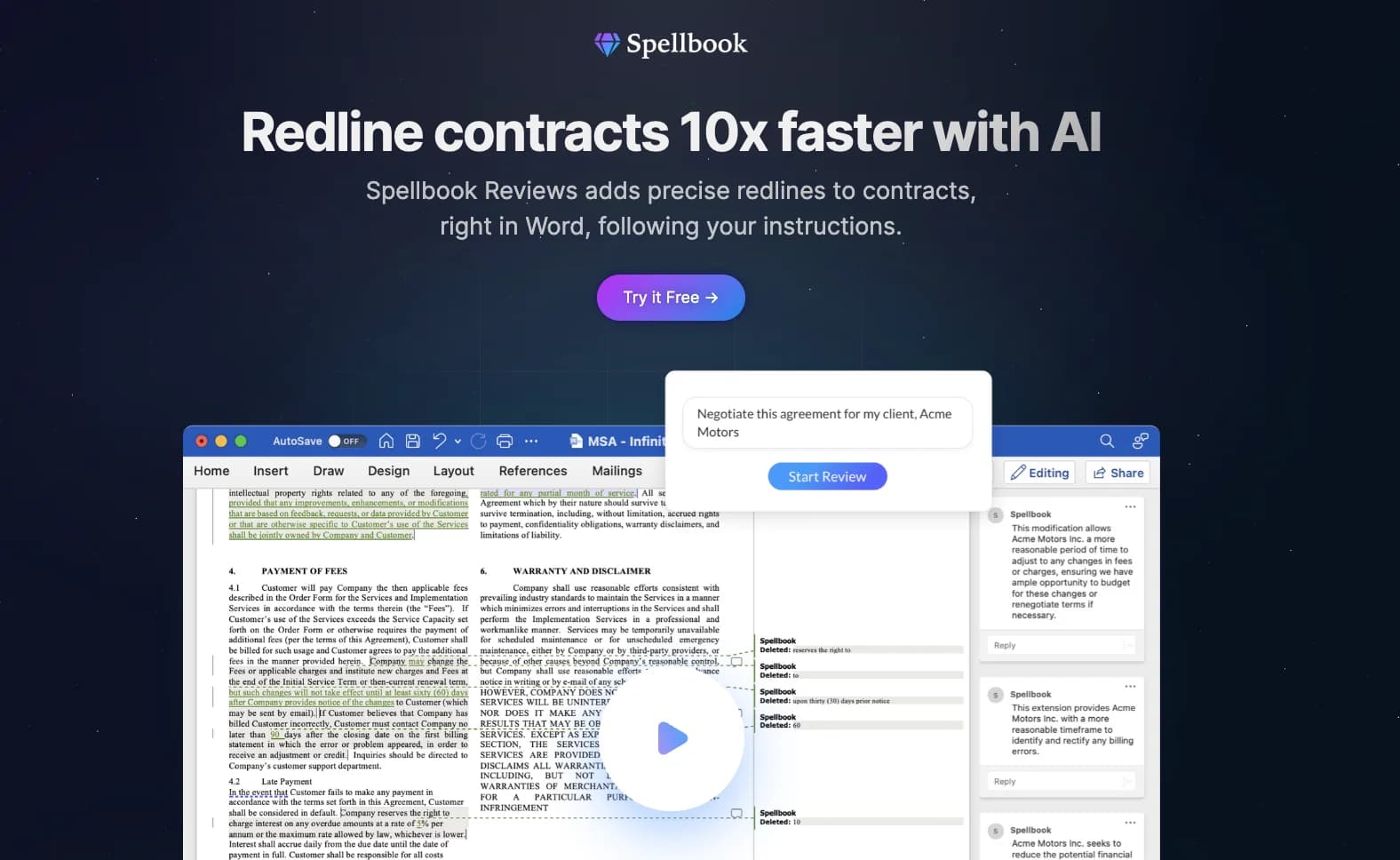
Spellbook emerges as a cutting-edge tool in the realm of legal technology, designed to transform the tedious task of contract drafting and review. This AI-driven platform leverages the power of OpenAI's GPT-4, among other large language models, to provide legal professionals with smart, context-aware assistance right within Microsoft Word. Aimed at lawyers, paralegals, and legal tech enthusiasts, Spellbook promises to expedite the contract creation process, making it up to ten times faster.
Spellbook distinguishes itself by being one of the few tools specifically tuned for legal contract work and integrated with Microsoft Word. Its reliance on GPT-4 ensures that it is at the forefront of AI performance, offering legal professionals unparalleled assistance.
Spellbook excels in streamlining the contract drafting and review process for legal professionals. Its integration with Microsoft Word and the use of GPT-4 for AI-driven suggestions make it a highly efficient and reliable tool in the legal tech space. With its focus on enhancing productivity and strategic legal work, Spellbook is an essential asset for nearly 2,000 law firms and in-house legal teams looking to innovate and automate their legal workflows.
Who is Using Spellbook?
Corporate Lawyers
For drafting and negotiating complex business contracts.
In-House Legal Teams
To streamline contract management within companies.
Law Firms
Both large and small practices use it to enhance productivity.
Paralegals
To assist in preparing documents and managing contract revisions.
Uncommon Use Cases
Academic institutions may use it for instructional purposes in legal courses; Non-profits might adopt it to manage their legal documentation more efficiently.
Key Features
Rating Breakdown
Pricing Plans
Free Trial
- Spellbook offers a 7-day trial to experience its capabilities
Subscription-Based Access
- Pricing details are provided upon request after the trial period
Which Spellbook plan should you pick?
Start with the seven-day trial to evaluate Spellbook Suite; choose Associate when your work requires multi-document matters and upgrade through custom team pricing as usage expands.
Spellbook Suite
Good for legal teams who need Word-based Review, Draft, Ask, Benchmarks, and Playbooks.
Associate
Good for teams who need a multi-document agent for complex legal matters and document-set workflows.
Spellbook Use Cases
Contract review and redlining
Review contracts, identify risks and drafting errors, and apply suggested redlines and comments in Word.
Outcome: Faster, more consistent first-pass review.
Playbook enforcement
Create reusable rules with preferred language, fallback positions, risk levels, and approval requirements.
Outcome: Consistent review against organizational standards.
Contract drafting
Draft clauses or complete documents from prompts, templates, precedent language, or model documents.
Outcome: Faster creation of first drafts.
Multi-document transaction work
Use Associate to analyze, revise, compare, and align multiple documents in a legal matter.
Outcome: Less manual coordination across document sets.
Precedent and document-library search
Connect document repositories or upload files, then ask questions and retrieve relevant clauses and context.
Outcome: More useful answers grounded in existing legal work.
Workflow Ideas with Spellbook
Playbook-based contract review
- 1Create or upload a Playbook
- 2Run it against a contract
- 3Review, edit, and apply suggested redlines and comments
Repository-grounded legal analysis
- 1Connect OneDrive, Dropbox, SharePoint, Google Drive, or iManage
- 2Select or upload relevant documents
- 3Ask questions, compare agreements, or extract clauses
Multi-document transaction drafting
- 1Provide a term sheet and relevant precedent documents
- 2Ask Associate to create or update the document set
- 3Review the generated documents and tracked changes
How Spellbook fits into your stack
Microsoft Word Integration
Spellbook operates directly within Word, a staple in legal document processing.
AI Model Compatibility
Uses GPT-4, ensuring state-of-the-art AI performance.
Data Security
Adheres to legal industry standards for data privacy and security.
Scalability
Designed to meet the needs of solo practitioners to large firms.
Pros
- +Time-Saving: Drastically reduces the time spent on drafting and reviewing contracts.
- +Strategic Focus: Allows lawyers to concentrate on higher-value aspects of legal work.
- +Easy Integration: Blends with existing tools like Microsoft Word, ensuring minimal disruption to workflows.
- +Comprehensive Knowledge: Trained on a wide array of sources, ensuring suggestions are well-informed.
Cons
- −Specific to Microsoft Word: May not be compatible with other word processing software.
- −Learning Curve: Users may need time to get accustomed to AI-driven suggestions and features.
- −Dependence on AI Accuracy: The tool's effectiveness is contingent on the precision of the AI model.
Limitations & when to consider alternatives
Known limitations
- Google Docs feature differences. The Google Docs add-in does not currently provide Draft, Compare to Market, Definitions, Benchmarking, or full Word-equivalent redlining.
- OCR is required for searchable PDFs. Scanned PDFs without OCR can upload, but Associate cannot reference their contents.
- Resource sharing is not fully granular. Resources can be shared with teams or the organization, but not with individual users; library sharing is folder-level.
- No audit logs or dedicated admin portal. Spellbook currently does not provide audit logs for role changes or resource sharing, and administration occurs in the add-in.
- Word documents are the only directly editable Associate files. Associate can reference several file types, but only DOCX files can be edited directly.
Look elsewhere when
- You need a native mobile application.
- You need a public developer API.
- You need full feature parity in Google Docs.
How to Use Spellbook
- 1
Spellbook provides resources and support to help users maximize the tool's potential, including tutorials and customer service for effective onboarding and troubleshooting.
Who is Spellbook For?
Law firms
Spellbook helps legal teams streamline contract drafting, review, redlining, and communication.
In-house legal teams
Spellbook helps internal legal departments handle contract work without relying as heavily on outside counsel.
Transactional lawyers
Associate supports multi-document matters, document-set review, and drafting across related transaction documents.
Legal operations and administrators
Access controls, teams, roles, permissions, and shared resources help organizations manage Spellbook usage.
Frequently Asked Questions
Does Spellbook offer a free trial?
Yes. Lawyers and legal teams can try Spellbook free for seven days; larger organizations may receive extended trials.
What does Spellbook help legal teams do?
Spellbook supports contract review, drafting, redlining, document questions, benchmarking, playbooks, and multi-document legal matters.
Does Spellbook support SSO?
Yes. Spellbook uses Microsoft accounts for SSO and can use authentication controls such as MFA within Microsoft Entra.
What file types can Associate reference?
Associate can reference DOC, PDF, TXT, and XLSX files. PDFs need a searchable OCR text layer for their contents to be read.
Can teams share Spellbook resources?
Yes. Teams can share Playbooks, clause libraries, saved prompts, and custom review prompts with teams or the organization.
Does Spellbook integrate with cloud storage?
Yes. Document libraries can connect to OneDrive, Dropbox, SharePoint, Google Drive, and iManage.
Community reviews
Be the first to share your experience.
Sign in to leave a review for Spellbook.
Spellbook Alternatives
Looking for alternatives to Spellbook? Here are similar tools in the same category:
Learn to Master Spellbook
With Skill Leap courses
Get in-depth training on Spellbook and 50+ other AI tools with our expert-led video courses.
Start 7-Day Free Trial