
Scribble Diffusion
Turn doodles into digital masterpieces with AI-powered Scribble Diffusion.
Watch Scribble Diffusion in Action
Key Takeaways
- What it is
- Turn doodles into digital masterpieces with AI-powered Scribble Diffusion.
- Best for
- AI-Powered Image Generation
- User-Friendly Interface
- Open-Source Project
- Rating
- 4.6/5
What is Scribble Diffusion?
Scribble Diffusion is an innovative AI tool designed to transform sketches into polished images with the help of advanced artificial intelligence. This open-source project, brought to life by Replicate, is a testament to the marvels of modern technology, offering a bridge between raw creativity and digital artistry. Designed for artists, designers, and anyone in between, Scribble Diffusion simplifies the process of turning a simple doodle into a refined masterpiece.
Scribble Diffusion stands out by democratizing the process of digital art creation. It breaks down the barriers between conceptual sketches and detailed imagery, making high-quality digital art creation accessible to a broader audience. Its open-source nature invites continuous improvement and innovation, fostering a community of creative minds working together to push the boundaries of what AI can achieve in art.
Scribble Diffusion excels in transforming the initial sparks of creativity into polished digital images, making it an indispensable tool for anyone interested in digital art. Its user-friendly interface, coupled with the power of AI, opens up new possibilities for artists and designers to explore. Being open-source, it not only benefits from continuous enhancements by the global community but also fosters a spirit of collaboration and innovation. Scribble Diffusion represents a significant step forward in making sophisticated digital art tools accessible to a wider audience, empowering users to bring their imaginative visions to life with unprecedented ease and efficiency.
Who is Using Scribble Diffusion?
Digital Artists
For converting rough sketches into detailed artworks.
Graphic Designers
To expedite the design process by quickly generating visual concepts.
Educators
In art and design courses, demonstrating the integration of AI in creative processes.
Hobbyists
Individuals exploring digital art as a hobby find it a useful tool for learning and experimentation.
Uncommon Use Cases
Architects using it to visualize building concepts from initial sketches; Fashion designers for illustrating clothing designs from basic outlines.
Key Features
Rating Breakdown
Scribble Diffusion Use Cases
Sketch-to-image generation
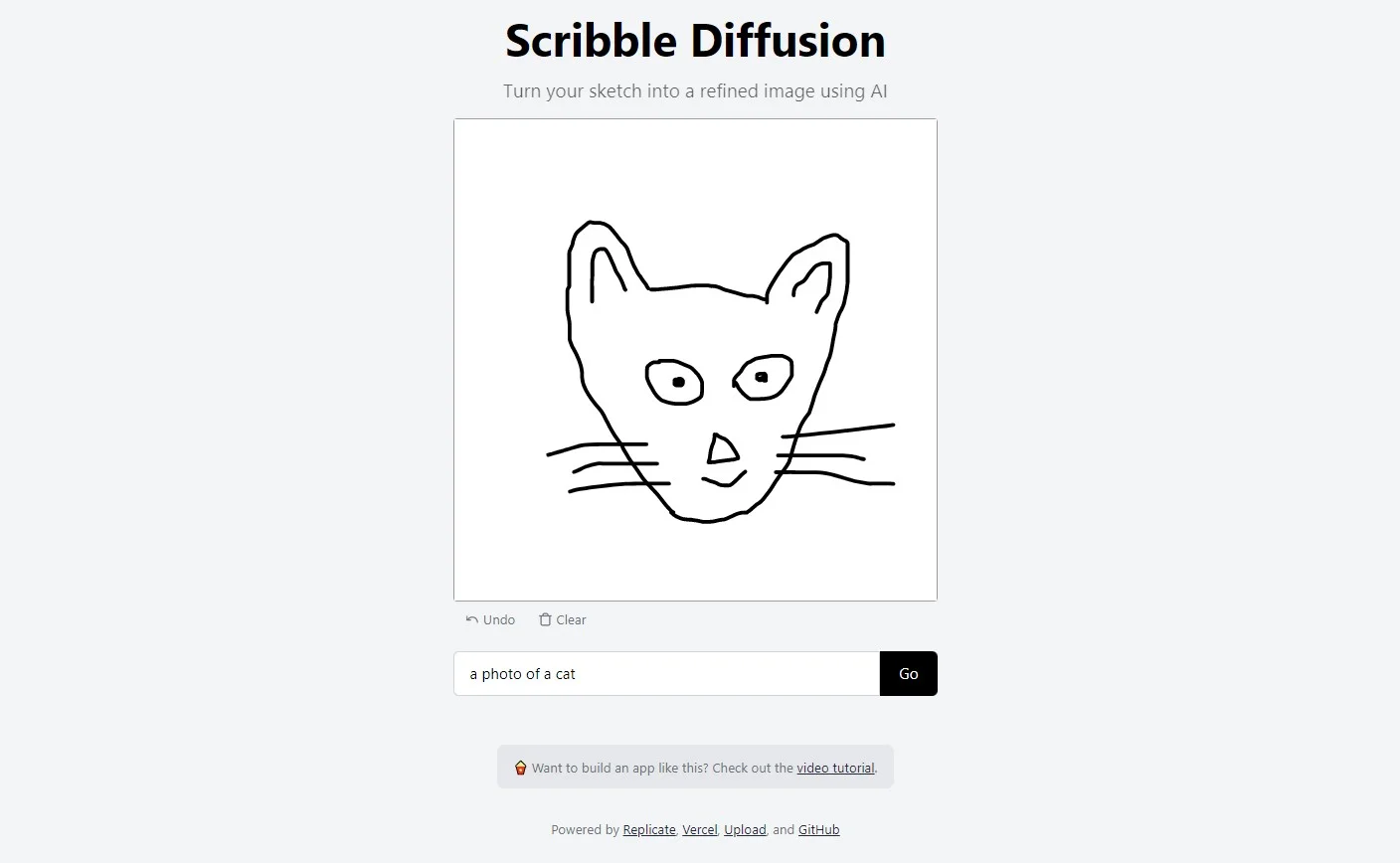
Draw a rough concept and provide a text description for the desired result.
Outcome: A refined AI-generated image.
Visual concept exploration
Iterate on visual ideas by combining different scribbles with descriptive prompts.
Outcome: Alternative visual interpretations of a concept.
Local experimentation
Run the open-source project locally and test the browser-based generation interface.
Outcome: A self-hosted development or experimentation environment.
Workflow Ideas with Scribble Diffusion
Turn a sketch into an image
- 1Draw a rough sketch in the browser
- 2Enter a text description
- 3Generate the refined image
Run a local instance
- 1Install Node.js and project dependencies
- 2Add a Replicate API token
- 3Run the development server and open localhost:3000
How Scribble Diffusion fits into your stack
Browser
Scribble Diffusion is a browser-based web app where users provide a sketch or scribble and a text prompt to generate a refined image.
Pros
- +Enhances Creativity: Enables users to bring their imaginative concepts to life with ease.
- +Time-Saving: Reduces the amount of time required to create detailed images from sketches.
- +Cost-Effective: Being an open-source tool, it is available for free, making advanced digital art accessible to everyone.
- +Community Support: Benefits from the contributions of a global community, continuously improving and evolving.
Cons
- −Requires Basic Understanding: Users need a fundamental grasp of digital art concepts to maximize the tool’s potential.
- −Dependent on Input Quality: The quality of the output heavily relies on the clarity and detail of the initial sketch.
- −Limited to Digital Art: Primarily focused on digital image generation, which may not cater to all artistic needs.
Limitations & when to consider alternatives
Known limitations
- Browser-oriented product. The documented interface is a web application, and local usage opens the project in a browser.
- Requires Replicate for documented deployment. The setup requires a Replicate API token because the application talks to the Replicate API.
- Limited documented input types. The product documentation describes text prompts and scribbles, not document uploads or image-analysis workflows.
Look elsewhere when
- You need a native mobile app.
- You need a public developer API.
- You need file analysis or vision understanding.
How to Use Scribble Diffusion
- 1
The tool's open-source community often shares tutorials and guides, ranging from basic usage tips to advanced techniques for maximizing the potential of Scribble Diffusion. These resources are invaluable for users looking to deepen their understanding and skills.
Frequently Asked Questions
What does Scribble Diffusion do?
It turns a rough sketch and text prompt into a refined image using AI.
What technology powers Scribble Diffusion?
The project uses Replicate, ControlNet, Vercel, Next.js, React components, and Tailwind CSS.
Can I run Scribble Diffusion locally?
Yes. The documented setup uses Node.js, a Replicate API token, npm install, and npm run dev.
Where does the local app run?
After setup, the documentation directs users to open localhost:3000 in a browser.
Community reviews
1 review from people who use Scribble Diffusion.
Sign in to leave a review for Scribble Diffusion.
Ljubomir Sinozic
Scribble Diffusion Alternatives
Looking for alternatives to Scribble Diffusion? Here are similar tools in the same category:
Learn to Master Scribble Diffusion
With Skill Leap courses
Get in-depth training on Scribble Diffusion and 50+ other AI tools with our expert-led video courses.
Start 7-Day Free Trial