
Pgrammer
AI-driven platform personalizing coding interview preparation.
Key Takeaways
- What it is
- AI-driven platform personalizing coding interview preparation.
- Pricing
- $12 per month
- Best for
- AI-Powered Hints
- Solution Analysis
- Customizable Difficulty Levels
- Rating
- 4.5/5
What is Pgrammer?
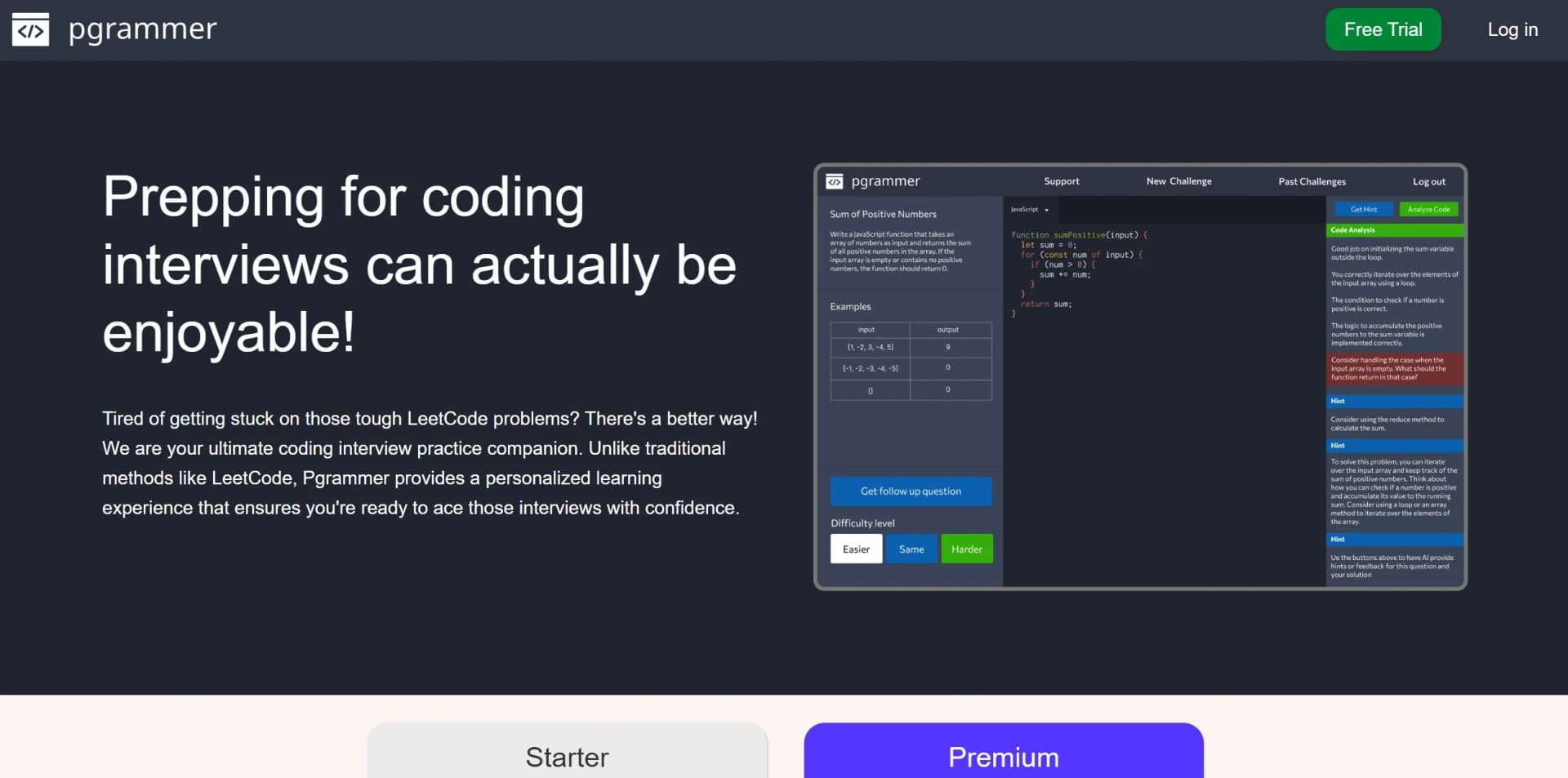
Pgrammer is an innovative AI-driven platform designed to revolutionize the way aspiring software engineers prepare for coding interviews. Unlike traditional methods, Pgrammer offers a personalized and engaging learning experience that ensures users are ready to excel in their interviews with confidence. Tailored for individuals aiming to enhance their coding skills, Pgrammer simplifies the preparation process by providing dynamic coding challenges, real-time hints, and insightful solution analyses.
Pgrammer stands out with its AI-driven approach to coding interview preparation, transforming traditional methods into an interactive and personalized experience. Its ability to provide real-time hints and detailed solution analysis sets it apart, ensuring users remain engaged and motivated throughout their learning journey.
Pgrammer offers an invaluable resource for anyone preparing for coding interviews, blending AI innovation with practical learning tools. Its personalized approach and comprehensive features make it a standout choice for both novice and experienced developers, ensuring a confident stride into any technical interview.
Who is Using Pgrammer?
Aspiring Software Engineers
Preparing for coding interviews with personalized challenges and insights.
Seasoned Professionals
Enhancing interview readiness despite extensive real-world experience.
Career Changers
Transitioning into tech roles by building coding proficiency and confidence.
Coding Bootcamp Graduates
Solidifying skills through targeted practice and feedback.
Educators incorporating Pgrammer into curriculum for interactive learning.
Freelancers refining skills for diverse project demands.
Key Features
Rating Breakdown
Pricing Plans
Starter Plan
- Free access with basic features
- Including coding challenge questions and customizable difficulty levels
Premium Plan
$12 per month
- Offering advanced features like unlimited real-time hints and comprehensive solution analysis
Which Pgrammer plan should you pick?
Start with Starter for free practice and upgrade to Premium when you need the paid plan's expanded access to real-time hints and solution analysis.
Starter
Good for candidates who need free coding challenges, difficulty customization, challenge history, hints, and solution analysis.
Premium
Good for candidates who need the $12/month plan with real-time hints and solution analysis; the site says it can be canceled at any time.
Pgrammer Use Cases
Practice coding interview questions
Generate realistic coding challenges based on the engineer level being targeted in an interview.
Outcome: More targeted interview preparation.
Get help while solving
Request real-time hints before or during implementation, including when the solution is incomplete.
Outcome: Progress without immediately relying on a complete solution.
Analyze a coding solution
Submit completed or partial code for feedback, intelligent suggestions, and deep analysis.
Outcome: Identify improvement areas and strengthen coding skills.
Practice frontend interview questions
Work on questions involving HTML, CSS, JavaScript, and TypeScript.
Outcome: Prepare for frontend-oriented technical interviews.
Adjust practice difficulty
Ask for a follow-up challenge that is easier, at the same level, or harder.
Outcome: Keep practice aligned with current ability.
Workflow Ideas with Pgrammer
Progressive interview practice
- 1Select the engineering level for the target interview
- 2Complete an AI-generated coding challenge
- 3Request an easier, same-level, or harder follow-up
Hint-guided problem solving
- 1Start a coding challenge
- 2Ask for a hint before or during implementation
- 3Submit the complete or partial solution for analysis
Frontend interview preparation
- 1Choose a frontend-oriented challenge
- 2Work in HTML, CSS, JavaScript, or TypeScript
- 3Use code analysis and hints to improve the solution
How Pgrammer fits into your stack
Browser
Pgrammer is used through its web application to practice coding interview questions. Users select difficulty and programming language, write solutions, and request AI-generated hints or analysis.
Pros
- +Personalized Learning Experience: Tailors challenges to individual skill levels, offering a customized preparation journey.
- +Comprehensive Language Support: Supports a broad spectrum of programming languages, enhancing accessibility for users.
- +Real-Time Feedback: Provides immediate insights and constructive feedback to aid continuous improvement.
- +User-Friendly Interface: Intuitive design ensures a seamless experience for users of all levels.
Cons
- −Initial Learning Curve: Some users may require time to fully navigate and utilize all features effectively.
- −Limited Interviewer Tools: Currently, the platform primarily focuses on candidate preparation rather than interviewer functionalities.
Limitations & when to consider alternatives
Known limitations
- Public version targets candidates. The official site says the public version is currently intended for candidates preparing for interviews, not interviewer workflows.
- AI output can be inaccurate. The terms warn that machine-learning output may occasionally be incorrect and should be reviewed and verified.
- Language support is curated. Pgrammer says it has hand-selected over 20 languages, while broader editor support comes from Monaco and may not equal dedicated tooling support.
- Submitted content may be used to improve services. The terms state that Pgrammer may use submitted content to develop and enhance its services.
- Code deletion requires contacting Pgrammer. Users may request deletion of user-generated code and related data by contacting Pgrammer.
Look elsewhere when
- You need interviewer-facing functionality.
- You need native mobile access.
- You need an API or developer platform.
How to Use Pgrammer
- 1
Choose a plan
Start with Starter at $0, or select Premium at $12/month if you need the paid feature set.
- 2
Set your interview level
Tell Pgrammer what level of engineer you are interviewing as so it can generate a realistic challenge.
- 3
Select or use a supported language
Practice in one of the more than 20 supported programming languages, including frontend languages such as HTML, CSS, JavaScript, and TypeScript.
- 4
Solve the challenge
Write a complete or partial solution in the code editor.
- 5
Request hints or analysis
Use real-time hints while solving, then submit your code for feedback and solution analysis.
- 6
Adjust the next challenge
Ask for a follow-up question at an easier, same, or harder difficulty.
Who is Pgrammer For?
Coding interview candidates
The public product is designed to help candidates practice realistic coding interview questions and prepare for interviews.
Software engineers
Users can select an engineering level, practice across many programming languages, and receive hints and analysis on their solutions.
Frontend developers
Pgrammer explicitly supports frontend UI questions involving HTML, CSS, JavaScript, and TypeScript.
Frequently Asked Questions
How does Pgrammer determine challenge difficulty?
Before a challenge, Pgrammer asks what level of engineer you are interviewing as and uses AI to generate a realistic question. You can request an easier, same-level, or harder follow-up.
How does Pgrammer work?
Pgrammer uses GPT-4 through an interface with dynamically engineered prompts that simulate a FAANG-level software engineer. It interprets code, provides hints, and analyzes complete or partial solutions.
What programming languages does Pgrammer support?
Pgrammer states that it has selected over 20 programming languages. Its Monaco-based editor supports more than 75 programming and markup languages.
Does Pgrammer support frontend UI questions?
Yes. Pgrammer documents questions involving HTML, CSS, JavaScript, and TypeScript, with code analysis and hints designed for those languages.
Can Pgrammer be used to interview candidates?
The public version is intended for candidates preparing for interviews. Pgrammer directs users interested in interviewer functionality to contact Shipyard Media.
Community reviews
3 reviews from people who use Pgrammer.
Sign in to leave a review for Pgrammer.
Jason Varbedian
Jake Barnett
Arsen
Pgrammer Alternatives
Looking for alternatives to Pgrammer? Here are similar tools in the same category:
Learn to Master Pgrammer
With Skill Leap courses
Get in-depth training on Pgrammer and 50+ other AI tools with our expert-led video courses.
Start 7-Day Free Trial