
InteriorAI
Revolutionize interior design with AI: instant photorealistic renders and virtual staging.
Watch InteriorAI in Action
Key Takeaways
- What it is
- Revolutionize interior design with AI: instant photorealistic renders and virtual staging.
- Best for
- AI-Driven Design Transformation
- Diverse Style Selection
- Virtual Staging Capabilities
- Rating
- 4.5/5
What is InteriorAI?
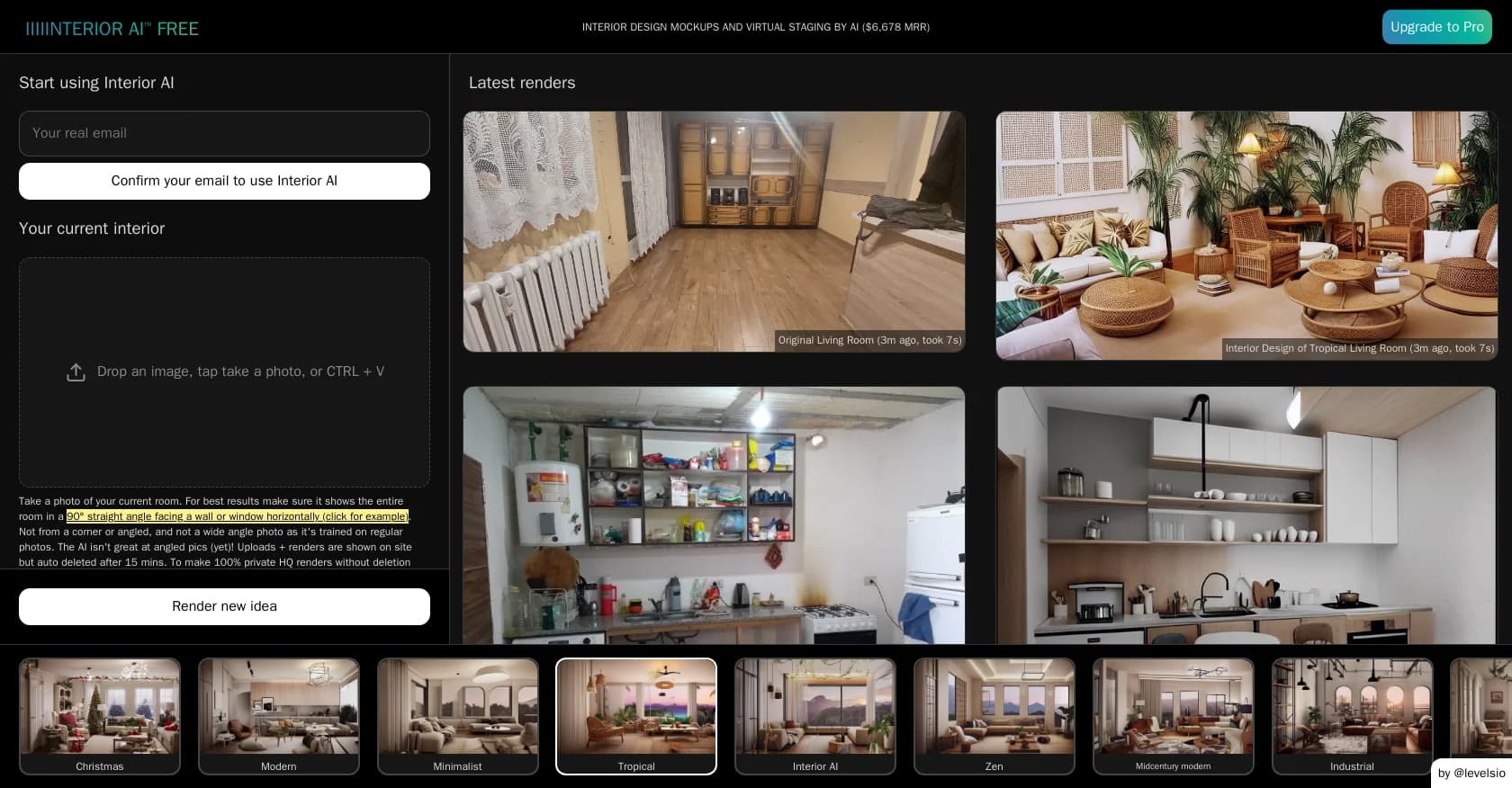
InteriorAI is a virtual solution for interior design that utilizes AI-powered tools to transform the way we visualize and stage living and working spaces. It caters to both individuals and professionals, offering a cost-effective and time-saving alternative to traditional interior design methods. The platform stands out for its ability to convert photographs, sketches, and SketchUp files into photorealistic renders within seconds, showcasing an innovative approach to modern design challenges.
InteriorAI stands out with its rapid transformation of sketches and images into detailed, photorealistic interiors. Its virtual staging feature is particularly valuable for real estate, providing a competitive edge by showcasing properties without physical staging costs.
InteriorAI offers a swift and economical solution for interior design and virtual staging. Its broad style selection and the ease of transforming sketches and images into high-quality renders make it a powerful tool for homeowners, real estate professionals, and designers. Despite occasional AI artifacts, its strengths in speed, functionality, and cost-efficiency make it compelling for those seeking to reimagine spaces with cutting-edge technology.
Who is Using InteriorAI?
Homeowners
Redesigning living spaces without extensive remodeling.
Real Estate Agents
Enhancing property listings with virtual staging.
Interior Designers
Incorporating AI-assisted visualizations into their design process.
Architects
Quickly visualizing space transformations for client presentations.
Uncommon Use Cases
Event planners conceptualizing event spaces; DIY enthusiasts experimenting with home renovation ideas.
Key Features
Rating Breakdown
Pricing Plans
Free Trial
- Access some features of InteriorAI without immediate commitment
Subscription Plans
- Various tiers offer increased functionality and render limits
Which InteriorAI plan should you pick?
Start with Pro for basic redesigns and commercial use; upgrade to Premium for editing, virtual staging, upscale tools, people, walkthrough videos, and VR; choose Ultra for higher quality, storage, speed, and concurrency.
Pro
Good for users who need up to 1,000 designs monthly, custom prompts, style remixing, and commercial use.
Premium
Good for users who need up to 5,000 designs monthly plus editing, virtual staging, upscaling, lighting, furniture, video, and VR features.
Ultra
Good for high-volume users who need up to 25,000 designs monthly, ultra-quality renders, unlimited storage, faster rendering, and a dedicated rendering server.
InteriorAI Use Cases
Redesign an existing room
Upload a room photo, select a style, and generate alternative interior designs.
Outcome: Photorealistic redesign concepts.
Virtually stage empty spaces
Upload an empty-room photo and select Virtual Staging AI to add furniture.
Outcome: Furnished listing-ready concepts.
Convert sketches to renders
Use Sketch2Image to transform interior sketches into photorealistic renderings.
Outcome: Rendered versions of early concepts.
Render SketchUp designs
Upload a screenshot from SketchUp and transform it into a photorealistic render.
Outcome: More realistic architectural visualization.
Create walkthrough media
Turn an AI interior design into a 3D flythrough video or explore it in VR.
Outcome: Immersive presentation media.
Workflow Ideas with InteriorAI
Redesign a current room
- 1Upload a sharp, well-lit room photo
- 2Select a room type and interior style
- 3Generate and compare redesigned renders
Stage an empty property
- 1Upload an empty-room photo
- 2Choose Virtual Staging AI and a room style
- 3Generate furnished alternatives for the property
Turn a concept into presentation media
- 1Upload a sketch or SketchUp screenshot
- 2Generate a photorealistic interior render
- 3Create a flythrough video or VR walkthrough
How InteriorAI fits into your stack
Photo Uploads
Accepts various image formats including JPG, PNG, and WebP.
Device Compatibility
Accessible from laptops and mobile devices.
SketchUp Compatibility
Integrates seamlessly for enhanced design renderings.
Design Style Variety
Supports over 50 interior design styles for comprehensive customization.
Pros
- +Speed and Convenience: Delivers design renderings in seconds, accessible from laptops or phones.
- +Cost-Effective Solution: Reduces reliance on expensive interior designers.
- +Real Estate Advantage: Enhances property listings with virtual staging, potentially leading to faster sales at higher prices.
- +User-Friendly Interface: Simplifies the design process with easy-to-navigate options and direct style selections.
Cons
- −Potential for AI Artifacts: Some renders may display imperfections or unrealistic elements.
- −Learning Curve: New users may require time to familiarize themselves with the tool's capabilities and output nuances.
- −Limited Physical Interaction: Lacks hands-on guidance and personal touch typical of traditional interior design services.
Limitations & when to consider alternatives
Known limitations
- HEIC files are unsupported. The service accepts JPG, PNG, WebP, and AVIF, so HEIC images must be converted first.
- Photo angle affects results. Straight-on photos toward a wall or window perform better than angled photos.
- AI artifacts can occur. The site warns that generated designs may contain illogical furniture or construction artifacts.
- Prompt mode is experimental. The product warns that custom prompts may produce random or poor results.
- Refunds are unavailable. The FAQ says refunds cannot be offered because of image-generation processing costs.
Look elsewhere when
- You need a native mobile app from the same vendor.
- You need a developer API.
- You need shared team workspaces.
How to Use InteriorAI
- 1
Detailed guides and tutorials are available on the InteriorAI website to help users navigate and maximize the platform's features.
Who is InteriorAI For?
Homeowners
Homeowners can visualize different styles and redesign ideas for their existing rooms.
Interior designers
Interior designers can use rapid AI renderings to explore and present design concepts.
Real estate professionals
Real estate users can virtually stage empty homes with furniture for listings.
SketchUp users
Users with SketchUp designs can transform screenshots into photorealistic renders.
Frequently Asked Questions
How does Interior AI's interior designer work?
Upload a room photo, choose a design style, and receive a photorealistic redesign in about half a minute.
How do the different design modes work?
Modes include 3D Vision, 2D Photo, Virtual Staging AI, Freestyle, Sketch2Image, and SketchUp.
Can I virtually stage with Interior AI?
Yes. Virtual Staging AI fills empty spaces with furniture while maintaining the building's construction.
What file formats of photos do you accept?
Accepted formats are JPG, PNG, WebP, and AVIF. HEIC is not currently supported.
How long does it take to create an AI interior design?
The site says one design takes about 25 seconds, with up to 16 designs rendered simultaneously.
What will you do with my interior photos?
Photos are used to create renders, are not used for training, and remain accessible only to the user.
Community reviews
1 review from people who use InteriorAI.
Sign in to leave a review for InteriorAI.
deleightfull a
InteriorAI Alternatives
Looking for alternatives to InteriorAI? Here are similar tools in the same category:
Learn to Master InteriorAI
With Skill Leap courses
Get in-depth training on InteriorAI and 50+ other AI tools with our expert-led video courses.
Start 7-Day Free Trial