
Creative Reality Studio (D-ID)
Animate and personalize digital content with AI-driven avatars and multilingual capabilities.
Watch Creative Reality Studio (D-ID) in Action
Key Takeaways
- What it is
- Animate and personalize digital content with AI-driven avatars and multilingual capabilities.
- Best for
- Personalized Video Creation
- Multilingual Text-to-Speech
- Scalability
- Rating
- 4.4/5
What is Creative Reality Studio (D-ID)?
Creative Reality Studio (D-ID) is a cutting-edge platform that leverages the power of artificial intelligence to revolutionize the creation of digital media. As a seasoned reviewer, I've had the pleasure of exploring numerous AI tools, but D-ID stands out with its focus on personalizing and animating digital content. This tool is designed to empower content creators, marketers, and educators to transform static images and text into engaging videos with lifelike avatars, all with remarkable ease.
Creative Reality Studio (D-ID) sets itself apart with its unparalleled ability to animate and personalize content at scale. The platform's use of deep learning and AI to create lifelike digital avatars is a game-changer for industries looking to innovate in digital communication and content creation.
Creative Reality Studio (D-ID) excels in transforming the landscape of digital content creation with its innovative AI-driven approach to video production. The platform's strength lies in its ability to generate personalized and engaging content that captures the audience's attention. With its comprehensive feature set and ease of use, Creative Reality Studio (D-ID) is an invaluable asset for anyone looking to elevate their digital presence and communication strategies.
Who is Using Creative Reality Studio (D-ID)?
Content Creators
For crafting unique and personalized video content that resonates with viewers.
Marketing Professionals
To create dynamic advertising materials that can be easily localized for different markets.
Educational Institutions
For developing interactive learning materials that engage students.
Customer Service Departments
Utilizing avatars for consistent and friendly customer interactions.
Uncommon Use Cases
Museums are using it to bring historical figures to life; Podcasters are employing it to produce visual content for audio-only material.
Key Features
Rating Breakdown
Pricing Plans
Custom Plans
- D-ID offers tailored pricing depending on the client's needs and usage volume
Free Demo
- Prospective users can request a free demo to experience the capabilities of the platform
Which Creative Reality Studio (D-ID) plan should you pick?
Start with Trial to evaluate the Studio, choose Lite for small non-commercial projects, and upgrade to Pro, Advanced, or Enterprise for greater capacity, commercial use, collaboration, and governance.
Trial
Good for evaluating the platform and testing avatar-video creation before subscribing.
Lite
Good for individuals creating a small number of non-commercial videos with standard presenters.
Pro
Good for creators and teams who need more credits, premium presenters, and commercial usage.
Advanced
Good for higher-volume production requiring advanced controls, customization, and expanded capabilities.
Enterprise
Good for organizations needing custom volume, team collaboration, integrations support, governance, and enterprise security.
Creative Reality Studio (D-ID) Use Cases
Learning and development
Create avatar-led tutorials, explainer videos, and onboarding content.
Outcome: Clearer learning content that can be produced in multiple languages.
Marketing campaigns
Create branded videos for campaigns, announcements, and social posts.
Outcome: Faster production of consistent, on-brand marketing content.
Human resources
Explain employee benefits or create avatar-led job postings.
Outcome: More engaging employee and recruiting communications.
Sales and customer success
Create personalized avatar messages, product explainers, and onboarding videos.
Outcome: More personalized prospect and customer communications.
Internal communications
Share company updates, plans, and news through avatar-presented videos.
Outcome: Clear, human-centered organizational updates.
Workflow Ideas with Creative Reality Studio (D-ID)
Create an avatar video
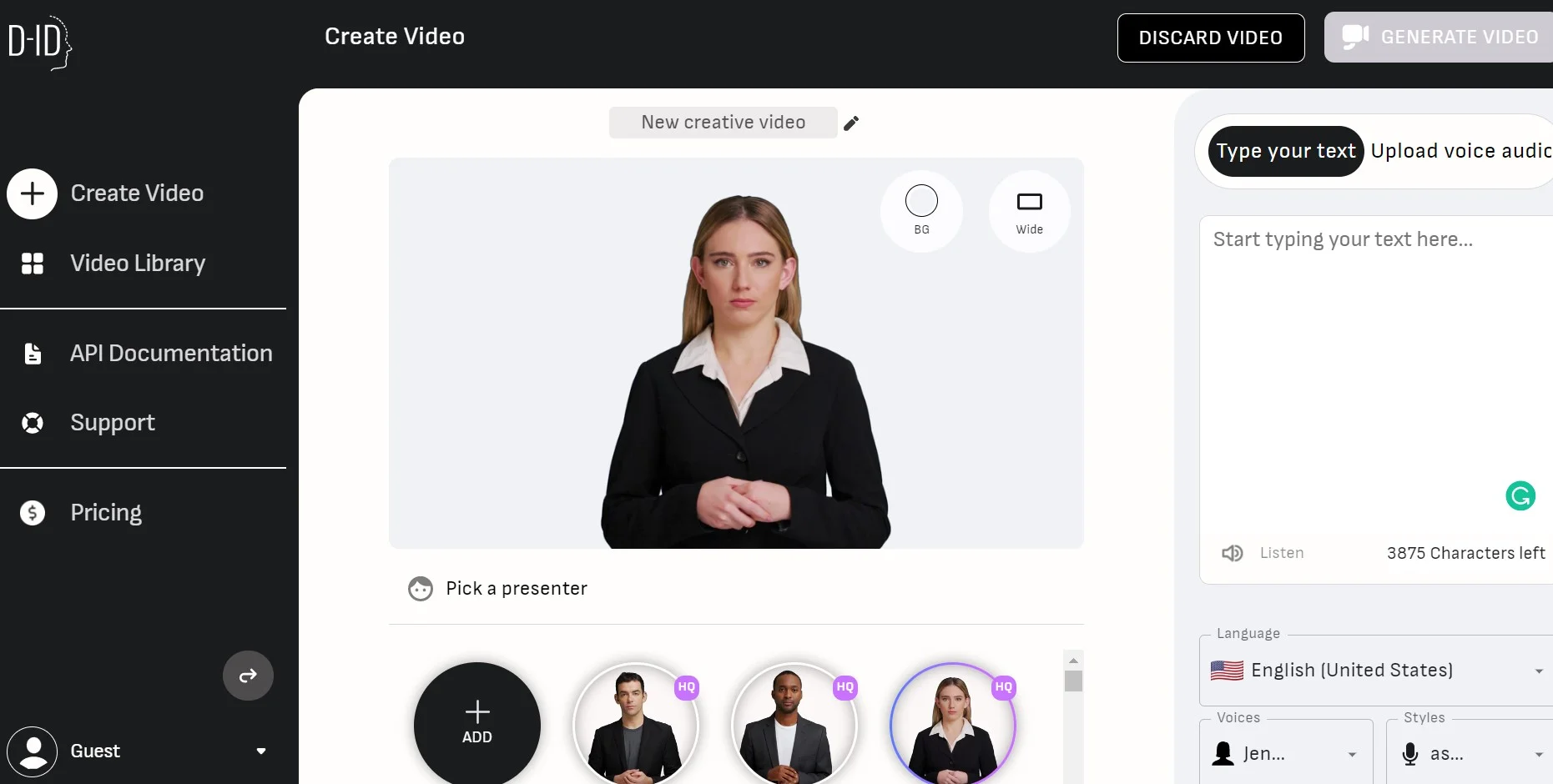
- 1Choose a stock avatar or upload an image
- 2Enter or upload a script and select a voice and language
- 3Generate and download the MP4 video
Build a knowledge-grounded visual agent
- 1Create an agent and choose its avatar, voice, role, and personality
- 2Upload knowledge documents such as PDF, TXT, or PPTX files
- 3Share the agent by link or embed it on an approved website domain
Create a personalized video campaign
- 1Choose stock or custom avatars and define a customizable script
- 2Add dynamic fields for personalized recipient or campaign data
- 3Generate campaign videos and customize the landing page branding
How Creative Reality Studio (D-ID) fits into your stack
API for Custom Integration
Enables businesses to integrate the tool's capabilities into their existing software ecosystems.
Cross-Platform Compatibility
Works across various devices and browsers for a seamless user experience.
Cloud-Based Infrastructure
Ensures that users can access the tool from anywhere, fostering collaboration and remote work.
Social Media Integration
Easily share created content across social media platforms.
Pros
- +Enhanced Engagement: Captivate audiences with personalized and animated content that stands out in the digital space.
- +Time-Saving: Quickly generate videos without the need for complex video production setups or on-camera talent.
- +Cost-Effective: Reduce production costs by minimizing the resources typically required for video creation.
- +User-Friendly: Intuitive interface that simplifies the process of animating avatars and creating videos.
Cons
- −Creative Limitations: While highly innovative, there may be constraints on the customization of avatars and animations.
- −Dependency on Tech: Relies on users having a stable internet connection and a capable device to handle processing.
- −Learning Curve: New users may require some time to fully understand and utilize all the features effectively.
Limitations & when to consider alternatives
Known limitations
- Five-minute maximum video length. Videos created through Creative Reality Studio or the D-ID API are limited to five minutes.
- Uploaded image size limit. Images uploaded to Creative Reality Studio or the API cannot exceed 10 MB.
- Limited knowledge-document capacity. Agents support up to five knowledge documents, with each document limited to 500,000 characters.
- Credits expire. Unused subscription credits do not carry over and become void at the end of the billing period.
- Watermarks on lower plans. Trial and Lite videos receive D-ID watermarks, while Pro and Advanced videos receive an AI watermark.
Look elsewhere when
- You need a permanent free tier rather than a time-limited trial.
- You need a desktop installer instead of a browser-based platform.
- You need programmatic code generation rather than avatar-video generation.
- You need image analysis or vision understanding as a core Studio feature.
How to Use Creative Reality Studio (D-ID)
- 1
For those looking to master Creative Reality Studio (D-ID), the platform offers a range of tutorials and a comprehensive knowledge base on their website to help users get started and maximize the tool's potential.
Who is Creative Reality Studio (D-ID) For?
Businesses
Businesses can create avatar-led videos for marketing, training, internal communications, sales, and customer success.
Individual content creators
Individual creators can produce digital-human videos without cameras or traditional production crews.
Learning and development teams
L&D teams can create explainer, onboarding, tutorial, and multilingual training videos.
Marketing and sales teams
Marketing and sales teams can create branded campaigns, personalized avatar messages, and social content.
Developers
Developers can use D-ID APIs and embedded agents to build custom avatar applications and conversational experiences.
Frequently Asked Questions
What is Creative Reality Studio?
It is D-ID’s self-service platform for creating videos with moving and talking digital avatars.
What inputs can Creative Reality Studio use?
Users can create videos from text, audio, still images, uploaded faces, and stock avatars.
How long can generated videos be?
Videos created through Creative Reality Studio or the D-ID API are limited to five minutes.
What image formats and sizes are supported?
Uploaded images are limited to 10 MB and supported formats include JPEG, JPG, and PNG.
How many languages are supported?
D-ID supports multilingual avatar videos, with the mobile app documenting 120 languages.
Can Creative Reality Studio be used on mobile?
Yes. D-ID provides dedicated iOS and Android mobile applications that sync with D-ID accounts.
Community reviews
1 review from people who use Creative Reality Studio (D-ID).
Sign in to leave a review for Creative Reality Studio (D-ID).
Ziggi Zukerman
Creative Reality Studio (D-ID) Alternatives
Looking for alternatives to Creative Reality Studio (D-ID)? Here are similar tools in the same category:
Learn to Master Creative Reality Studio (D-ID)
With Skill Leap courses
Get in-depth training on Creative Reality Studio (D-ID) and 50+ other AI tools with our expert-led video courses.
Start 7-Day Free Trial