
Assets Scout
AI-driven tool for real-time asset tracking and management.
Watch Assets Scout in Action
Key Takeaways
- What it is
- AI-driven tool for real-time asset tracking and management.
- Pricing
- $10 per month
- Best for
- Real-Time Asset Tracking
- Predictive Maintenance Alerts
- Comprehensive Reporting Tools
- Rating
- 4.4/5
What is Assets Scout?
Assets Scout is a cutting-edge AI tool designed to revolutionize asset management and tracking. By leveraging advanced machine learning algorithms, this tool provides comprehensive insights and real-time monitoring of assets, making it an essential solution for businesses aiming to optimize their asset utilization and reduce operational costs. Tailored for industries such as logistics, manufacturing, and IT services, Assets Scout simplifies the complex task of asset tracking and offers an intuitive platform for efficient management.
Assets Scout stands out with its robust predictive maintenance capabilities, a game-changer for industries reliant on asset longevity and uptime. Its ability to integrate real-time tracking with predictive analytics sets it apart, offering unparalleled insights that drive efficiency and cost savings.
Assets Scout offers a comprehensive solution for businesses looking to enhance their asset management capabilities. With its real-time tracking, predictive maintenance alerts, and user-friendly interface, it empowers organizations to make data-driven decisions that improve efficiency and reduce costs. While there are some initial setup challenges and integration limitations, the overall value and utility of Assets Scout make it a worthwhile investment for those seeking to optimize their asset management processes.
Who is Using Assets Scout?
Logistics Companies
Utilizing the tool for efficient fleet and inventory management.
Manufacturing Firms
Employing it for monitoring machinery and equipment usage.
IT Service Providers
Leveraging the tool to track IT assets and software licenses.
Healthcare Facilities
Using it for managing medical equipment and supplies.
Uncommon Use Cases
Educational Institutions: Tracking educational resources and technology assets.; Event Management Companies: Managing event equipment and logistics.
Key Features
Rating Breakdown
Pricing Plans
Basic Plan
$10 per month
- Small businesses with basic tracking needs
Enterprise Plan
- Custom pricing available for large organizations requiring extensive asset management solutions
Which Assets Scout plan should you pick?
Start with Basic for occasional searches, then upgrade to Supporter, Pro, Daily, or Yearly when you need more searches or Favorites.
Basic Plan
Good for users who need up to 10 free visual searches per month.
Supporter
Good for users who need more than the Basic allowance and access to Favorites.
Pro
Good for users who need unlimited searches and advanced features.
Daily
Good for users who need unlimited searches for short-term or occasional intensive work.
Yearly
Good for users who want annual access with Favorites included.
Assets Scout Use Cases
Find a 3D asset from a reference image
Upload a screenshot, moodboard frame, render, or work-in-progress image to find visually similar models, textures, and materials.
Outcome: Relevant assets from multiple marketplaces appear in one search.
Recreate a rendered scene
Use Picture Assembler to analyze a scene and identify the separate assets it could be assembled from.
Outcome: The scene is broken into candidate models, textures, and materials.
Search free asset libraries
Search supported marketplaces such as ShareTextures and other stock libraries containing free and paid assets.
Outcome: Users can locate suitable no-cost or premium asset options.
Organize discovered assets
Save results to Favorites, organize them into lists, and share lists with colleagues.
Outcome: Promising assets remain organized for later use.
Workflow Ideas with Assets Scout
Reference image to matching asset
- 1Upload a JPG, PNG, BMP, or WebP reference image.
- 2Run visual search across the supported stock marketplaces.
- 3Open the matching asset pages on the source marketplaces.
Rendered scene to component assets
- 1Upload a rendered scene or composition.
- 2Use Picture Assembler to identify separate scene components.
- 3Review the suggested models, textures, and materials.
Save and share asset candidates
- 1Search for assets using an image, clipboard content, or image URL.
- 2Save promising results to Favorites and organize them into lists.
- 3Share the lists with colleagues.
How Assets Scout fits into your stack
Browser
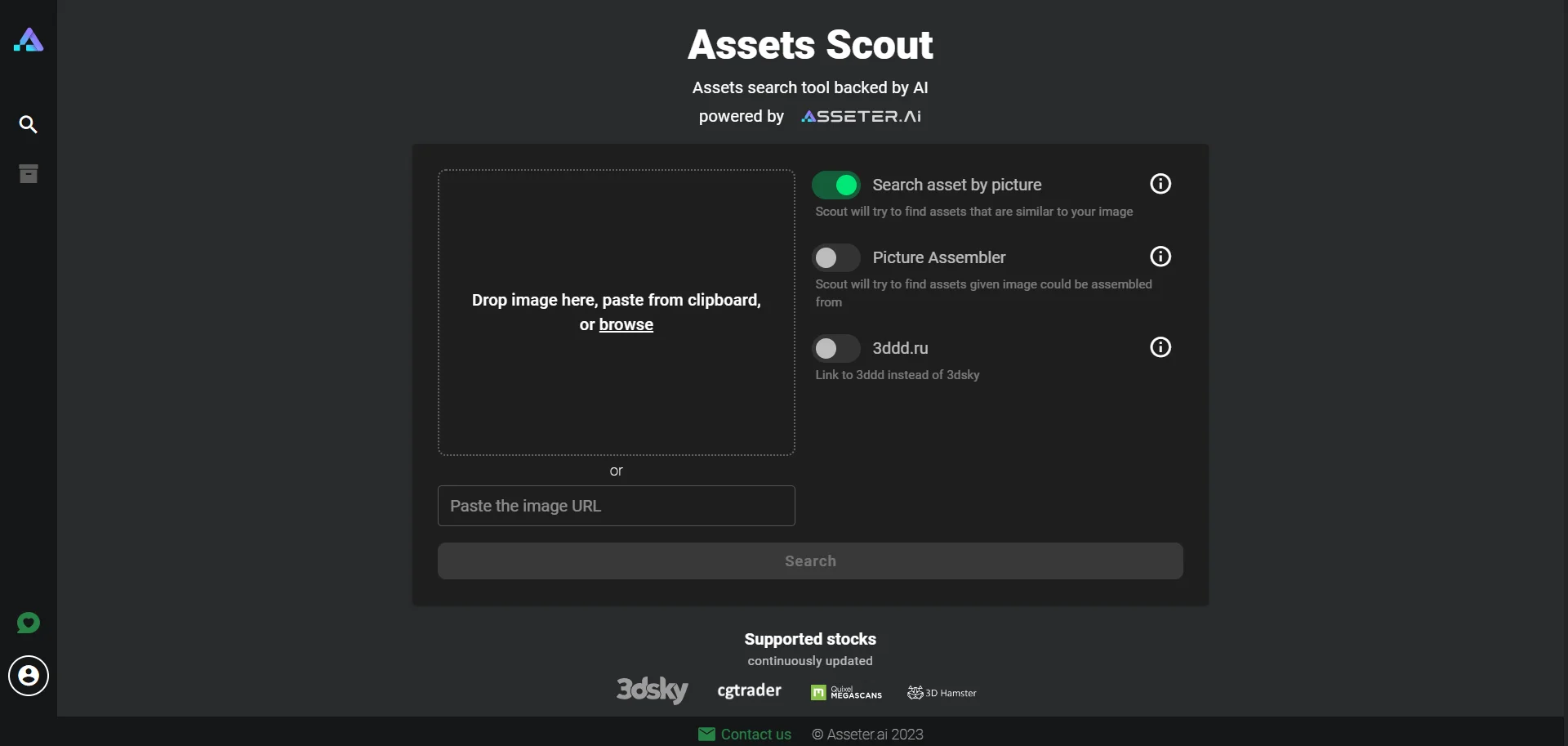
Scout is a web-based visual search tool where users upload or paste an image and search multiple 3D asset marketplaces.
Knowledge and files
Users provide JPG, JPEG, PNG, BMP, or WebP files, clipboard images, rendered scenes, or image URLs for visual asset discovery.
Pros
- +Enhanced Efficiency: Significantly reduces the time and effort required for asset management tasks.
- +Cost Savings: Helps lower maintenance and replacement costs through predictive insights.
- +User-Friendly Interface: Simplifies complex processes with an intuitive and easy-to-navigate platform.
- +Customizable Alerts: Allows users to set personalized alerts for various asset management needs.
Cons
- −Initial Setup Complexity: May require a learning curve and technical assistance during initial setup.
- −Limited Integration Options: Currently supports a limited range of third-party software.
Limitations & when to consider alternatives
Known limitations
- Basic searches are limited. The Basic Plan provides up to 10 free searches per month; unlimited searches require Pro or Daily.
- Supported image formats are limited. The documented upload formats are JPG, JPEG, PNG, BMP, and WebP.
- Results depend on supported marketplaces. Scout searches the listed stock marketplaces, while additional marketplace support must be requested through the app.
- Favorites are plan-dependent. Favorites are available on Supporter, Pro, and Yearly plans.
How to Use Assets Scout
- 1
Open Scout
Use the web application and start from the image-search interface.
- 2
Provide a reference
Upload a supported image, paste an image from the clipboard, or provide an image URL.
- 3
Run visual search
Submit the reference so Scout can analyze its visual features and search supported 3D stock marketplaces.
- 4
Review candidate assets
Compare visually similar models, textures, and materials returned from the marketplace search.
- 5
Use Picture Assembler when needed
For a complete rendered scene, use Picture Assembler to identify the individual assets that may compose it.
- 6
Save useful results
On eligible plans, add assets to Favorites, organize lists, and share lists with colleagues.
Who is Assets Scout For?
Archviz studios
Scout helps architectural visualization teams find furniture, lighting, architectural elements, and other 3D assets from reference images.
Game designers
Game designers can search across libraries containing game-ready props, environments, plugins, and other 3D content.
Product visualizers
Product visualizers can use visual search to locate models, materials, and textures matching a reference or rendered image.
3D artists
3D artists can search by appearance instead of guessing keywords across multiple asset marketplaces.
Frequently Asked Questions
What is Scout?
Scout is an AI-powered visual search tool that helps 3D artists find models, textures, and materials across multiple stock marketplaces.
How does the image search work?
Scout analyzes an uploaded image's visual features with computer vision and deep learning, then finds visually similar 3D assets.
What is Picture Assembler?
Picture Assembler analyzes a rendered scene or composition and identifies separate models, textures, and materials that could recreate it.
Which 3D stocks does Scout search?
Scout searches 3DSky, CGTrader, Quixel Megascans, 3DHamster, 3DBuy, ShareTextures, 3DExport, Zeel Project, and Fab.com.
Is Scout free to use?
The Basic Plan includes up to 10 free searches per month. Pro and Daily plans provide unlimited searches.
What image formats are supported?
Scout supports JPG, JPEG, PNG, BMP, and WebP files, with drag-and-drop, clipboard paste, and file browsing.
Community reviews
Be the first to share your experience.
Sign in to leave a review for Assets Scout.
Assets Scout Alternatives
Looking for alternatives to Assets Scout? Here are similar tools in the same category:
Learn to Master Assets Scout
With Skill Leap courses
Get in-depth training on Assets Scout and 50+ other AI tools with our expert-led video courses.
Start 7-Day Free Trial