
Adobe Firefly
Transform text into vibrant images and designs, boosting creativity effortlessly.
Watch Adobe Firefly in Action
Key Takeaways
- What it is
- Transform text into vibrant images and designs, boosting creativity effortlessly.
- Pricing
- Freemium
- Best for
- Text to Image Generation
- Generative Fill
- Text Effects
- Rating
- 4.5/5
What is Adobe Firefly?
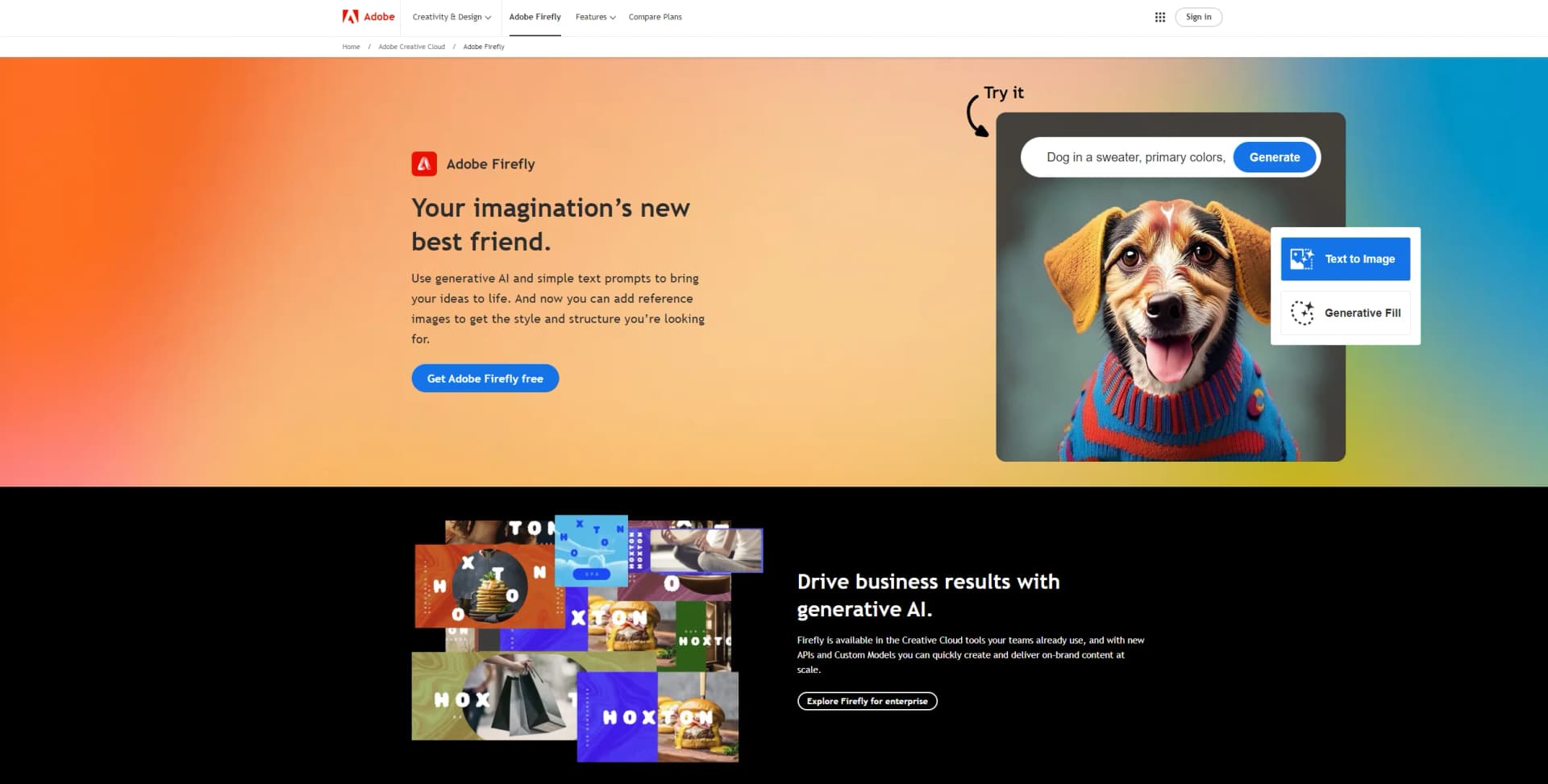
Adobe Firefly is an innovative generative AI tool designed to be every creative's new best friend. It harnesses the power of artificial intelligence to transform simple text prompts into vibrant, detailed images, making your imagination come to life like never before. With Adobe Firefly, creativity knows no bounds. Whether you're adding reference images to guide the style and structure of your creations or using its generative fill feature to seamlessly blend ideas, Adobe Firefly stands out as a revolutionary tool in the creative industry. Aimed at professionals and hobbyists alike, it simplifies complex design tasks, allowing for an explosion of creativity across various mediums.
Adobe Firefly sets itself apart by being deeply integrated within the Adobe ecosystem, offering seamless compatibility with other Adobe Creative Cloud tools. Its focus on commercial safety and ethical AI use further ensures that creators can confidently use their outputs in professional projects. Moreover, the tool's ability to understand and execute commands in over 100 languages makes it a globally accessible and versatile creative companion.
Adobe Firefly emerges as a cutting-edge tool that significantly enhances the creative process. Its ability to generate images, textures, and designs from simple text prompts offers an unmatched advantage for creatives looking to push the boundaries of their imagination. Coupled with its integration within the Adobe ecosystem and focus on commercial safety, Adobe Firefly is an indispensable asset for designers, marketers, and content creators aiming to elevate their creative projects efficiently and ethically.
Who is Using Adobe Firefly?
Graphic Designers
For creating unique designs and visuals effortlessly.
Digital Marketers
Generating engaging content for campaigns and social media.
Content Creators
Elevating blog posts, videos, and digital media with custom illustrations.
Educators and Students
Utilizing in teaching and learning digital art and design.
Uncommon Use Cases
Architects using it for conceptual visualizations; Fashion designers for pattern and textile ideation.
Key Features
Rating Breakdown
Pricing Plans
Free Tier
Free
- Adobe Firefly offers a generous free tier
- Allowing users to explore its capabilities without immediate investment
Premium Plan
- Details regarding the Premium plan are available on the official website
- Offering advanced features for professional use
Which Adobe Firefly plan should you pick?
Start with Firefly Free to test daily generations; upgrade to Firefly Standard for regular image and vector work, Pro for broader premium creation, or higher tiers for heavier video and audio production.
Firefly Free
Good for users who want to test Firefly with limited daily image, video, and audio generations.
Firefly Standard
Good for individual creators who need 2,000 monthly credits and unlimited access to standard image features.
Firefly Pro
Good for creators who need 4,000 credits plus Photoshop on web and mobile and Adobe Express Premium.
Firefly Pro Plus
Good for users who need 10,000 credits and substantially more capacity for premium creative generation.
Firefly Premium
Good for high-volume video and audio production requiring 50,000 credits and unlimited Firefly Video Model access.
Adobe Firefly Use Cases
Generate campaign imagery
Create images from text prompts, references, and selected Adobe or partner models.
Outcome: Produce multiple visual concepts quickly.
Edit product photos
Upload images and use text prompts to add, remove, or transform objects and backgrounds.
Outcome: Create polished product visuals without manual editing.
Build mood boards
Collect references, generated assets, and linked Creative Cloud documents on a shared canvas.
Outcome: Align collaborators around a creative direction.
Create consistent branded content
Train a Custom Model on brand images and generate new variations using the trained model.
Outcome: Maintain visual consistency across campaigns and assets.
Produce content at scale
Build workflows that combine inputs, generation, editing, transformation, and outputs for multiple assets.
Outcome: Automate repetitive creative production tasks.
Workflow Ideas with Adobe Firefly
Create a branded product campaign
- 1Upload approved product and brand images
- 2Train or select a Firefly Custom Model
- 3Generate campaign variations and save them to a shared project
Turn a product image into marketing assets
- 1Upload the product image
- 2Remove or replace the background with a text prompt
- 3Generate alternate sizes and versions for campaign channels
Automate batch creative production
- 1Add input image, text, or video nodes
- 2Connect generation, editing, and transformation processing nodes
- 3Run the workflow and export the completed assets
How Adobe Firefly fits into your stack
Creative Cloud Integration
Smooth workflow with other Adobe applications.
APIs and Custom Models
For enterprise users to create and deliver on-brand content at scale.
Global Language Support
Over 100 languages supported for text prompts, making it accessible worldwide.
Pros
- +Enhanced Creativity: Provides a vast canvas for creative exploration, allowing users to bring their wildest imaginations to life.
- +Time-Saving: Significantly reduces the time needed for creating complex images and designs, streamlining workflows.
- +User-Friendly: Despite its advanced capabilities, Adobe Firefly offers an intuitive interface that is accessible to users of all skill levels.
- +Commercially Safe: Designed with commercial use in mind, ensuring that creations are safe for professional projects.
Cons
- −Learning Curve: New users may need time to fully grasp the potential and nuances of generating images with AI.
- −Internet Dependency: Being a web-based tool, it requires a stable internet connection for optimal performance.
- −Limited to Adobe Ecosystem: Best suited for users already within or willing to join the Adobe ecosystem for creative tools.
Limitations & when to consider alternatives
Known limitations
- Daily and monthly generation limits. The free plan has limited daily generations, while paid plans use monthly generative-credit allocations for premium features.
- Prompt translation can be inaccurate. Prompts in many languages are machine-translated into English, so nuances can produce unexpected results.
- Image size limits. Standard Firefly image uploads and downloads have documented format and resolution limits, including a 2000-by-2000-pixel maximum for supported image workflows.
- Video editor import limits. Firefly video editor imports are limited to files under 20 GB, no longer than four hours, and no larger than 4096-by-4096 pixels.
- Regional availability restrictions. Firefly is unavailable in certain countries and territories, including Russia, Belarus, China, Cuba, Iran, North Korea, Syria, Crimea, and specified Ukrainian regions.
Look elsewhere when
- You need a dedicated desktop installer.
- You need a browser extension.
- You need programming-code generation.
How to Use Adobe Firefly
- 1
Adobe provides a range of tutorials from basic setup to advanced features, available directly on their website and through various learning platforms.
Who is Adobe Firefly For?
Creative professionals
Firefly supports image, video, audio, editing, ideation, and production workflows in one creative workspace.
Digital artists and designers
They can generate visuals, edit images with prompts, explore references, and develop consistent styles.
Social media content creators and marketers
Firefly supports fast creation and resizing of images, videos, social assets, and campaign variations.
Creative teams
Teams can collaborate in Boards, share assets, assign permissions, and organize generations in projects.
Enterprise organizations
Enterprise customers can manage Firefly access, roles, custom models, workflows, and large-scale content production.
Frequently Asked Questions
What is Adobe Firefly?
Adobe Firefly is a standalone web application and family of generative AI models for ideation, creation, editing, and creative production.
Is Adobe Firefly free?
Firefly offers a free plan with limited daily generations. Paid plans provide additional credits and premium capabilities.
What can Firefly create?
Firefly supports image, video, audio, text, and vector-oriented creative workflows, including generation, editing, transformation, and batch processing.
Can Firefly use custom models?
Eligible users can train Custom Models on uploaded images to generate content matching a subject, style, iconography, or brand expression.
Does Firefly have mobile apps?
Adobe provides dedicated Firefly apps for iOS and Android, alongside the Firefly web app.
What are Firefly Custom Models used for?
Custom Models help organizations create consistent image variations aligned with brand styles, campaign aesthetics, characters, or product imagery.
Community reviews
Be the first to share your experience.
Sign in to leave a review for Adobe Firefly.
Adobe Firefly Alternatives
Looking for alternatives to Adobe Firefly? Here are similar tools in the same category:
Learn to Master Adobe Firefly
With Skill Leap courses
Get in-depth training on Adobe Firefly and 50+ other AI tools with our expert-led video courses.
Start 7-Day Free Trial